No big buys this month — so why is your balance down?

Black White AccountingTrack the spending you never notice. Frictionless logging. Take back control.

The coffee grabbed on the way to work, the $4 delivery fee at lunch, the missed-train ticket upgrade, and that $2.99 iCloud charge quietly renewing for three years — these invisible money leaks, not big purchases, are why your balance keeps shrinking.
Free on the App Store
3 secto log an expenseFrictionless logging
16languages supportedMultilingual UI
500free local recordsLocal-first
AnytimeexportYour data, in your hands
3 secto log an expenseFrictionless logging
16languages supportedMultilingual UI
500free local recordsLocal-first
AnytimeexportYour data, in your hands
Features

See every bit of
invisible spending.

01

Track invisible spending

Coffee runs, deliveries, small subscriptions — ghost spending adds up to more than you think. Log each one and the statistics page shows this month's total invisible leak at a glance.

02

Frictionless logging

Amount, description — done in three seconds. No complicated categories, no nagging reminders, no cluttered screen you want to close on sight. Log it and move on with your day.

$85123s
03

Expose subscription fatigue

Record recurring subscriptions as expenses, and the monthly summary reveals how many apps you're quietly feeding. Build a spending firewall and cut the parasite subscriptions.

Monthly auto-chargesNAuto-renews-$15SAuto-renews-$10iForgot why I subscribed-$90GAuto-renews-$30Fixed spend this month-$145
04

Privacy-first, stored on device

Works offline, and your data stays on your device. Optional Pro unlocks cloud sync so your ledger survives switching phones. Dark mode and a fully multilingual interface included.

How it works

Three steps to
take back control.

Expense
Income

Local-first · Start without signing in

Local-first

Your data stays
in your hands.

Black White Accounting stores everything on your device by default. Start logging without an account; enable cloud sync only when you want a backup.

500
free local records
0
forced sign-ins
Anytime
export & backup
Built-in capabilitiesWorks offline
Data lives on your phone
Fast, reliable, works without internet
500 free records
Plenty to start tracking and try it out
Optional cloud sync
Back up across devices when you need it
One-tap spreadsheet export
Take your backup anywhere
Edit and delete
Fix any entry at any time
Paginated browsing
Smooth scrolling even with lots of records
The numbers

A focused tool,
zero noise.

0
main tabs — ledger and statistics
0
languages supported
0
free local records
0
time filters — from all-time to this year
Languages & roadmap

Designed for users
everywhere.

Detects your device language, with full localization.
More features on the way.

繁體中文
繁體中文
English
English
日本語
日本語
Español
Español
Français
Français
Deutsch
Deutsch
हिन्दी
हिन्दी
Português
Português
Русский
Русский
Bahasa Indonesia
Bahasa Indonesia
한국어
한국어
Italiano
Italiano
Türkçe
Türkçe
Tiếng Việt
Tiếng Việt
ไทย
ไทย
Polski
Polski
繁體中文
繁體中文
English
English
日本語
日本語
Español
Español
Français
Français
Deutsch
Deutsch
हिन्दी
हिन्दी
Português
Português
Русский
Русский
Bahasa Indonesia
Bahasa Indonesia
한국어
한국어
Italiano
Italiano
Türkçe
Türkçe
Tiếng Việt
Tiếng Việt
ไทย
ไทย
Polski
Polski
Cloud backup & sync
Pro feature
Receipt scanning + OCR
Coming soon
PDF & spreadsheet export
Coming soon
Cloud backup & sync
Pro feature
Receipt scanning + OCR
Coming soon
PDF & spreadsheet export
Coming soon
Cloud backup & sync
Pro feature
Receipt scanning + OCR
Coming soon
PDF & spreadsheet export
Coming soon
Cloud backup & sync
Pro feature
Receipt scanning + OCR
Coming soon
PDF & spreadsheet export
Coming soon
Privacy

Your finances,
your device.

Black White Accounting is designed local-first. Log expenses without an account; turn on cloud sync only when you want a backup.

Works offlineOn-device onlyExport anytimeOptional sign-inCloud sync

Local-first

Transactions are stored on your device by default. No registration — open the app and start logging.

Optional sign-in

Sign in only when you want cloud sync. Sign in with Apple is available on iOS.

You control your data

Export a spreadsheet backup anytime, edit or delete single entries, or clear all records in Settings.

Optional cloud sync

Back up across devices and restore when you switch phones. Push or pull cloud data from Settings.

App screens

A minimal interface,
clear at a glance.

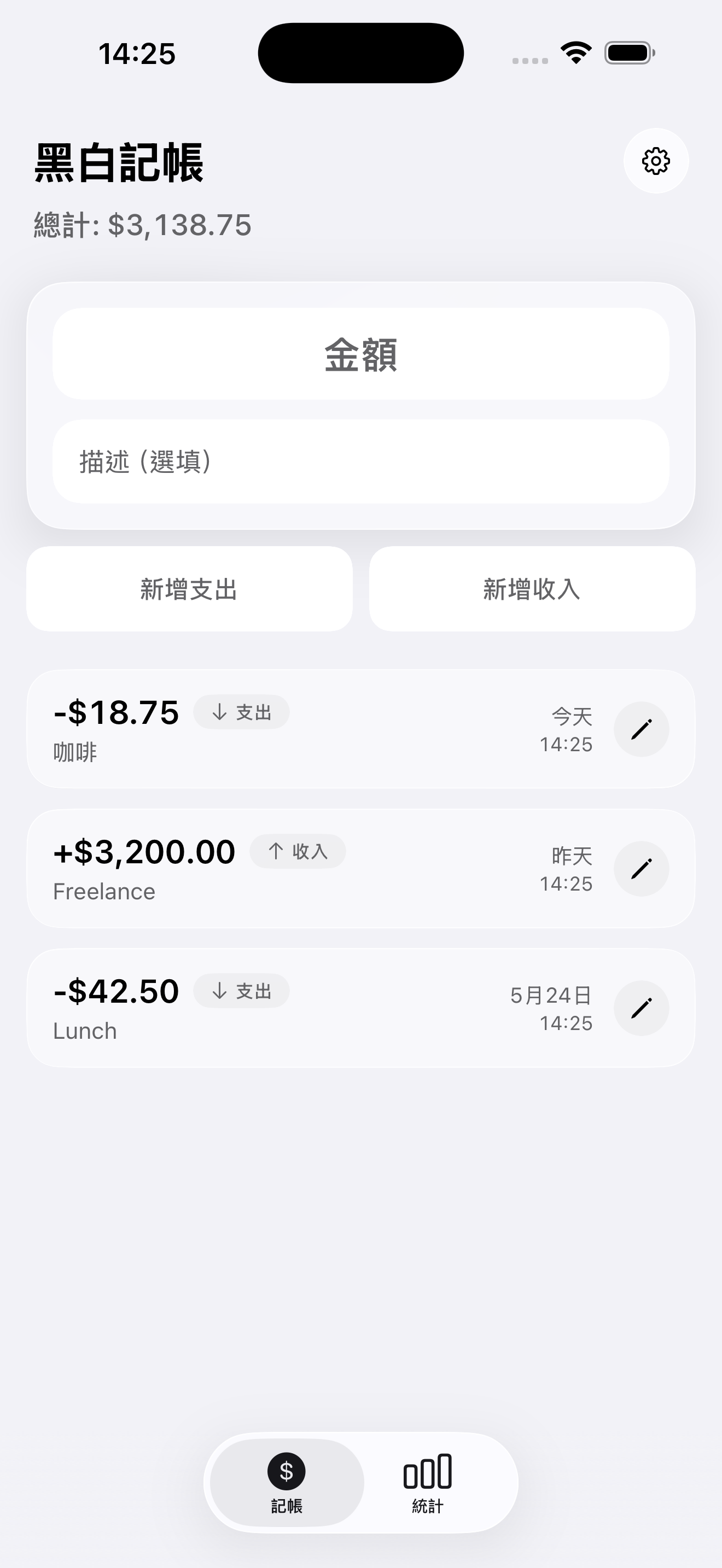
Two main tabs: ledger and statistics. Settings one tap away — frictionless logging, close it when you're done.

Black White Accounting ledger screen with the expense form and transaction list
What users say
01 / 04

No big purchases this month, so why was my balance down? Two weeks of logging showed me — coffee and delivery were the culprits.

S

Sarah

FreelancerLondon

Favorite feature

Caught the invisible leaks

Expense tracking should be frictionless

3-second loggingMinimal interfaceOffline modeExport anytimeStatisticsDark mode16 languagesCloud sync
Pricing

Start free.
Sync when ready.

Local tracking is completely free. Unlock unlimited records with a one-time Plus purchase, or upgrade to Pro for backup and cross-device sync.

MonthlyAnnual$14.99/yr
01

Free

Local tracking, zero barriers

$0/mo
  • Up to 500 local records
  • Expense and income logging
  • Statistics, filters, and sorting
  • Spreadsheet export
  • 16 languages + dark mode
  • No sign-in required
Download free
02

Plus

One-time purchase, unlimited local records

$14.99one-time
  • Everything in Free
  • Unlimited local records
  • Buy once, no subscription
  • No account, no cloud
  • Data stays on your device
  • Restore purchases
Unlock unlimited local
Cloud sync
03

Pro

Cloud-synced ledger that survives phone upgrades

$1.25/mo
  • Everything in Plus
  • Unlimited cloud storage
  • Push local records to the cloud
  • Restore from the cloud
  • Recover data on a new phone
  • Optional Sign in with Apple
  • Restore purchases
Unlock cloud sync
04

Coming soon

More time-saving features

Coming soon
  • Receipt scanning + OCR
  • Auto-fill amount and merchant
  • PDF export
  • Spreadsheet templates
  • Smarter categorization
  • More export formats
Join the waitlist

Plus and Pro prices are indicative — see the App Store / Google Play for final pricing.

FAQ

About Black White Accounting

Quick answers about what Flash Accounting is, its privacy model, plans, and supported platforms.

What is Black White Accounting (Flash Accounting)?
Black White Accounting (Flash Accounting) is a personal expense-tracking app for iOS focused on catching invisible spending with frictionless logging. Enter an amount and a description and you're done in about three seconds — enough to reveal the coffees, deliveries, and small subscriptions quietly draining your balance.
How is it different from other expense apps?
It drops complicated categories and nagging reminders in favor of minimal amount-plus-description logging. The interface is stark black and white, local-first, and usable without signing in, with a statistics page that shows this month's invisible leaks and subscription fatigue at a glance.
Where is my data stored? Is it safe?
By default every transaction is stored only on your device and works offline — no registration needed. When you want a backup, optional Pro cloud sync is available. You can export a spreadsheet, edit, or delete records at any time; your data stays under your control.
Do I need an account to use it?
No. The free tier tracks up to 500 records entirely on your device. You only sign in when you want cloud sync and cross-device restore (Sign in with Apple is available on iOS).
Which languages are supported?
16 languages: 繁體中文, English, 日本語, Español, Français, Deutsch, हिन्दी, Português, Русский, Bahasa Indonesia, 한국어, Italiano, Türkçe, Tiếng Việt, ไทย, and Polski — plus dark mode and automatic device-language detection.
What's the difference between Free, Plus, and Pro?
Free includes up to 500 local records, expense and income logging, statistics with filters and sorting, spreadsheet export, and the 16-language interface. Plus (indicative price $14.99 one-time) removes the record limit for unlimited local tracking — no subscription, no account, no cloud. Pro (indicative price $1.99/month or $14.99/year) includes everything in Plus and adds unlimited cloud storage, push-to-cloud, restore-from-cloud, and recovery on a new phone.
When is the Android version coming?
An Android version is planned but not yet on Google Play. Watch the official site or the App Store page for launch news.
Who is Black White Accounting for?
People who want fast logging without complicated categories; freelancers, office workers, and small business owners hunting down invisible spending and subscription fatigue; and privacy-minded users who want their data kept on their own device.

Flash Accounting · Track the spending you never notice. Frictionless logging. Take back control.

Ready to take back
control of your money?

It starts with seeing every expense you'd normally miss. Download Black White Accounting, log one in three seconds, and catch the ghost spending.

Free on the App Store

Start free · 500 local records